
You are getting a new website built, switching from Wix to WordPress or moving to a new domain name. The question that matters most is simple: will the customers who find you on Google today still find you next month? That is what a website migration is really about. This guide covers which type of migration you have, the steps Google itself describes, a filled-in redirect list for a typical small business site, the mistakes that cost rankings and the questions to ask your web designer before you sign.
The rules in this article come from Google Search Central and the help pages of Search Console, Wix, Shopify, WordPress and SIDN, the registry for .nl domains. Where something is our own view, we say so.
Checked on 24 November 2026. Rules, menus and prices can change. Check the sources before you decide.
What is a website migration?
In a migration, something changes about the address or the foundation of your site. For Google, one question matters most: do the URLs that visitors see change? If they do, Google has to learn, URL by URL, where each page now lives. Google describes a move as happening "on a per-URL basis": every old and new page has to be crawled at least once.
These are five common situations:
| What changes? | URLs change? | Redirects needed? | Change of Address tool? |
|---|---|---|---|
| Only your host or server | No | No | No |
| http to https | Yes | Yes, 301 | No, Google picks this up itself |
| New platform, same domain (e.g. Wix to WordPress) | Usually | Yes, per page | No |
| New menu structure or page names | Yes | Yes, per page | No |
| New domain name | Yes | Yes, per page | Yes |
A website migration that comes with a rebuild almost always falls into row three or four. Page names change, pages are merged and new ones appear. That is exactly where things tend to go wrong, because the designer focuses on the new look and forgets the old addresses.
Only changing hosting providers? Then your URLs stay the same and you need no redirects. Google does suggest considering lowering the TTL of your DNS records at least a week in advance, so the switch takes effect quickly.
Website migration in 7 steps
This is the order Google describes for a website migration, adapted to a normal business site of ten to fifty pages.
- List every old URL. Take them from your sitemap, from the Page indexing report in Search Console and from your analytics. Don't forget PDFs and images that other sites link to.
- Match each old URL to the best new one. That is your redirect list. There is an example below.
- Build and test on a staging site that is not indexed. Google mentions noindex and restricted access, for example by IP address, so search engines don't find a duplicate site.
- Go live in one go. For small and medium sites, Google recommends moving all URLs at the same time. Only large sites should move section by section.
- Switch on the redirects and test them. Use server-side permanent redirects, preferably 301 or 308. Check a good sample of old URLs with the URL Inspection tool in Search Console or with a script.
- Update Search Console. Verify the old and the new site, including every variant (with and without www). Submit the new sitemap and remove the old one. Remove any noindex or robots.txt blocks left over from staging.
- Update your links. Internal links should point straight at the new URL, not through a redirect. Then update your Google Business Profile, social media, email signature and listings on other sites.
Google adds one rule we repeat on every rebuild: change only one thing at a time. A new domain, a new design and new copy in the same week make it very hard to see what caused a drop.
The redirect list: an example for a 15-page site
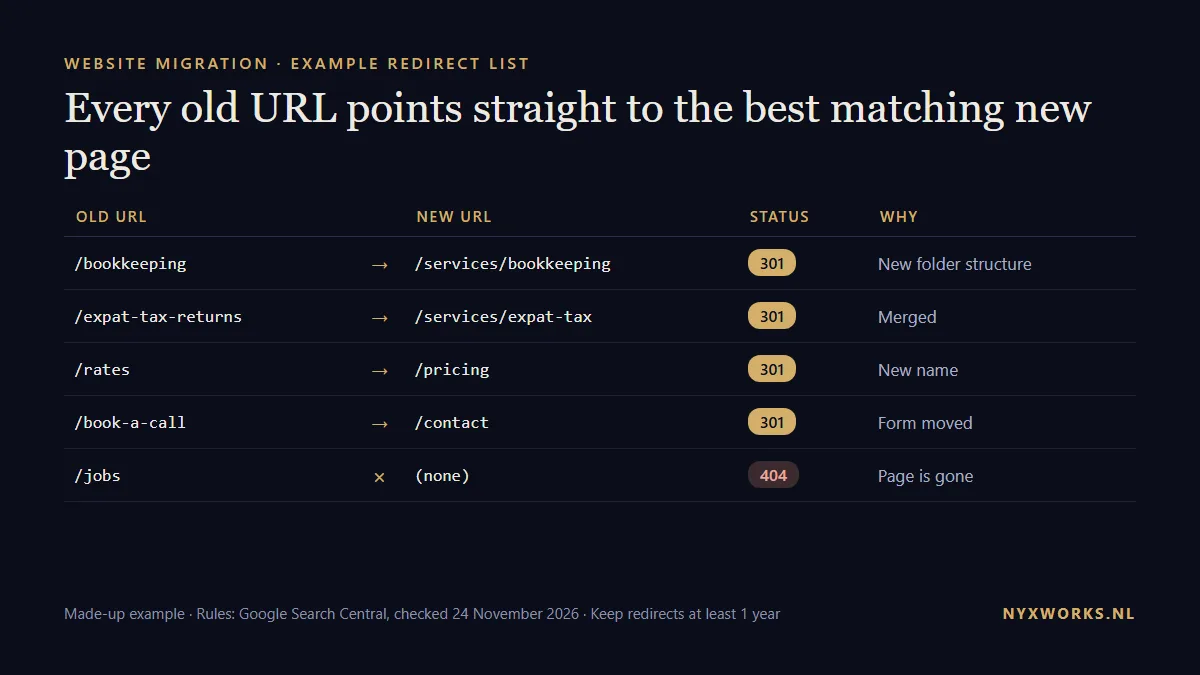
A redirect list is the heart of every website migration, and it is just a table. Below is a made-up example of an accountancy firm moving from Wix to a new WordPress site. Page names change, two pages are merged and one page disappears.
| Old URL | New URL | Status | Note |
|---|---|---|---|
| / | / | none | Homepage stays |
| /about | /about | none | Same address |
| /services | /services | none | Same address |
| /bookkeeping | /services/bookkeeping | 301 | New folder structure |
| /tax-returns | /services/tax-returns | 301 | New folder structure |
| /payroll | /services/payroll | 301 | New folder structure |
| /30-percent-ruling | /services/expat-tax | 301 | Merged into expat tax |
| /expat-tax-returns | /services/expat-tax | 301 | Merged into expat tax |
| /rates | /pricing | 301 | New name |
| /clients | /clients | none | Same address |
| /case-amsterdam-2021 | /clients | 301 | Merged into overview |
| /jobs | (none) | 404 | Gone, deliberately no redirect |
| /blog/vat-deadlines | /blog/vat-return-deadlines | 301 | New slug |
| /contact | /contact | none | Same address |
| /book-a-call | /contact | 301 | Form now on contact page |
Three things to watch. A page that is truly gone may return a 404 or 410; Google recommends exactly that. Merging pages into one new page is fine, as long as the content fits. And every row points straight at the final destination, with no stop in between.
Copy this table into a spreadsheet and add a "tested on" column. After launch you will know exactly which rows you have checked.
Five mistakes that cost rankings
These five website migration mistakes are easy to prevent if you know them in advance.
1. Sending everything to the homepage. It feels safe, but Google warns against it: redirecting many old URLs to one irrelevant page may be treated as a soft 404. The old page then loses its value instead of passing it on.
2. Redirect chains. Old to in-between to new. Googlebot can follow up to ten hops, but Google advises redirecting to the final destination directly and keeping chains ideally to no more than three. Chains often appear when a site has been moved before.
3. Forgetting the staging block. The new site goes live with noindex or a robots.txt that blocks everything. Google names this explicitly: don't forget to remove those blocks.
4. No new sitemap. Without a sitemap, Google only discovers your new URLs through links and redirects. That takes longer.
5. Changing everything at once. New domain, new structure, new copy and a new platform in one go. If traffic drops afterwards, nobody knows which of the four caused it.
One thing you don't need to worry about: according to Google, 301 and other permanent redirects don't cause a loss in PageRank. A good redirect costs you nothing. A missing one does.
Moving to a new domain: the Change of Address tool
If you move to a new domain name, for example after a rebrand, Search Console has a separate tool for that: the Change of Address tool. According to Google, you use it like this:
- Only after the redirects. Move and redirect first, then use the tool.
- Only for domain moves. Not for http to https, not for path changes within one domain, not for www to non-www and not for a change of hosting.
- Owner of both. You must own the old and the new property in Search Console, using the same Google account. The tool only works on domain-level properties.
- All variants. Submit the change for every variant of the old domain, with and without www, even ones you don't actively use.
- No chains. Don't move straight on from domain B to domain C.
Google forwards signals for 180 days. Keep the redirects at least that long, longer if traffic still arrives through them, and Google recommends continuing to pay for the old domain for at least a year. Its general site-move guide goes further: keep redirects for as long as possible, generally at least one year. We treat that one year as the minimum.
Moving a .nl domain to another registrar? You need the transfer token for your domain name. According to SIDN, your current registrar is obliged to give it to you within five days if you ask for it.
Ask your web designer this before you sign
A website migration rarely fails because of one big mistake. It fails because of a question nobody asked. You can paste these ten questions straight into an email:
- Will my current URLs stay, and if not, who makes the redirect list?
- Are the redirects 301 (permanent) and set on the server, not through JavaScript?
- Can I see and approve the redirect list before launch?
- Is the staging site set to noindex and closed to outsiders?
- Who removes that block at launch, and who checks it?
- Will my page titles and meta descriptions be kept or rewritten?
- Who has access to Search Console and DNS, and is everything in my name?
- Will the new sitemap be submitted and the old one removed?
- How long will the redirects stay in place? (The answer should be at least a year.)
- If traffic drops after launch, who looks into it, and within how many days?
For the wider side of hiring someone, such as quotes, ownership and planning, read how to choose a web designer in the Netherlands.
Traffic dropped after the migration? Find the cause
The good news first: a temporary dip after a website migration is normal. Google writes that visibility may fluctuate temporarily during a move, and that a small to medium-sized site can take a few weeks for most pages to move. Larger sites take longer. Panicking in week one is too early. Waiting without looking is too late.
Work in this order:
- Check whether the new pages may be indexed. Open a few important new URLs in the URL Inspection tool. Is there a noindex, or does robots.txt block them? That is the fastest and most common mistake.
- Find the 404s. The Page indexing report shows which URLs Google cannot find. Every old URL with visitors that now returns a 404 is missing a redirect.
- Test the redirects yourself. Click a handful of old URLs, including old blog posts. Do you land on the right page, in one step?
- Compare the content. Was a page that ranked well shortened, merged or rewritten? Then the drop may come from the content, not the technology.
- Check internal links and canonicals. Does your menu still point at old addresses? Does every new page have a canonical pointing to itself?
Want to know where your site stands technically? Run our free Website X-ray for a first overview of the basics.
WordPress, Wix or Shopify: what can you do yourself?
How you handle this depends on your platform.
Wix. Go to SEO & GEO in your dashboard, scroll down to Tools and settings and open the URL Redirect Manager. According to Wix, it automatically creates a 301 redirect when you change a page's URL slug; for Wix Blog pages you have to do it yourself. You can import up to 500 redirects per CSV file, with a maximum of 5,000 per site, and redirects only work with a custom domain.
Shopify. In your Shopify admin, go to Content > Menus and open the URL redirects. You can also import redirects with a CSV file, and Shopify provides a sample template. Note: according to Shopify, you can only redirect from broken URLs. If the old page still loads, the redirect won't work.
WordPress. If you change the slug of a post, WordPress redirects visitors from the old slug by itself. That does not apply to pages. For a full redirect list during a rebuild or platform switch, you will in practice use a plugin or rules on the server.
Not sure which platform suits you before you move? Read WordPress vs Shopify vs Wix first.
What does a website migration cost with NyxWorks?
A website migration is not a separate product for us; it is part of the build. Our web development page puts it like this: on a rebuild we review the current site first and plan redirects before launch where URLs need to change. Useful content, URLs, metadata and analytics can be preserved that way.
Prices as shown on our site on 24 November 2026, excluding VAT, first-year rates (they can change):
| What | Price | Standard rate |
|---|---|---|
| Growth: small-business website on WordPress, Wix or custom code | from €799 | €999 |
| Pro: custom-coded site | from €2,000 | €2,500 |
| Setup & Launch: domain, hosting, email, SSL and going live | €79 | €99 |
| SEO analysis: technical check, on-page audit and written report | €245 | €306 |
For a large platform, a shop with many products or a complex migration, we scope the work first. An SEO analysis before the move is useful if you want to know which pages bring in the most traffic today. Those are the ones you can't afford to lose.
Doing it yourself is perfectly possible for a small site. The work is mostly in the list: going through every old URL, choosing the best new one and testing everything after launch. Our estimate: allow a few minutes per page, plus the time to follow Search Console in the weeks after.
Frequently asked questions
How long does it take Google to process my new website?
After a website migration, Google says a small to medium-sized site can take a few weeks for most pages to move. Larger sites take longer. Your visibility may fluctuate during that period.
Will I lose rankings because of a 301 redirect?
Not because of the redirect itself. Google writes that 301 and other permanent redirects don't cause a loss in PageRank. Rankings are mostly lost through missing redirects, wrong destinations or content that was removed.
How long should I keep the redirects?
As long as possible, and generally at least a year, Google advises. For a domain move with the Change of Address tool, Google names at least 180 days, and longer while traffic still comes through the old URLs.
Do I need the Change of Address tool if I only change hosting?
No. That tool is only for a move to another domain or subdomain. When you change hosting, your URLs stay the same and there is nothing to move in Search Console.
Can I migrate my website myself?
For a small site with a few dozen pages, yes, if you build the redirect list carefully and test after launch. For a shop, a domain move or a site with a lot of traffic, it makes sense to have someone review it who has done this before.
Ready to move?
A website migration is mostly preparation: a complete list, one launch and a few weeks of careful watching. Want someone to look over your plan before you sign or go live? Book a 30-minute consultation for €30, or see how we handle a rebuild without losing what works.
Sources
- Google Search Central: How to move a site with URL changes
- Google Search Central: Changing your web hosting
- Google Search Central: Redirects and Google Search
- Search Console Help: Change of Address tool
- Search Console Help: URL Inspection tool
- Search Console Help: Page indexing report
- Wix Help: Setting up a 301 redirect for a page on your site
- Wix Help: Importing or exporting URL redirects with a CSV file
- Shopify Help: Creating and managing URL redirects
- WordPress Developer: wp_old_slug_redirect
- SIDN: Transferring your domain name
Checked on 24 November 2026. Rules, menus and prices can change. Check the sources before you decide.
Next step
Want this done for your business?
Tell us what you need. You get a fixed scope and a public price, usually within a day.
Start a project